
Creating high-quality content is not just about writing well — it’s also about writing the right amount.
Whether you’re a blogger, SEO professional, student, or digital marketer, word count plays a major role in content optimization.
In this guide, you’ll learn how to optimize content using word count, why it matters for SEO, and how tools like ILoveWords Word Counter and Website Page Word Counter can help you rank better on Google.
What Is Word Count in Content Writing?
Word count refers to the total number of words in a piece of content, such as:
- Blog posts
- Articles
- Landing pages
- Essays
- Website pages
For example:
“SEO improves website visibility.”
Word count = 4
While word count alone doesn’t guarantee rankings, it strongly influences content depth, relevance, and user satisfaction.
Why Word Count Matters for SEO
Google’s goal is to show the most helpful content for a search query. In most cases, helpful content:
- Covers a topic in depth
- Answers multiple user questions
- Provides examples and explanations
That usually requires enough words.
Key SEO Benefits of Optimizing Word Count
- Better keyword coverage
Longer, well-structured content naturally includes primary and related keywords. - Higher dwell time
Users stay longer on detailed content, which signals quality to search engines. - More ranking opportunities
Long-form content can rank for multiple long-tail keywords. - Improved topical authority
Google prefers pages that fully cover a topic, not thin content.
Ideal Word Count for Different Types of Content
There is no single perfect word count, but SEO data and best practices suggest the following:
Blog Posts
- Short blog: 600–800 words
- Standard SEO blog: 1,000–1,500 words
- In-depth guide: 2,000+ words
Website Pages
- Homepage: 300–600 words
- Service page: 700–1,200 words
- Landing page: 500–900 words
Product Descriptions
- Simple products: 150–300 words
- Competitive niches: 300–600 words
👉 The key is value per word, not filler content.
How to Optimize Content Using Word Count (Step-by-Step)
Step 1: Analyze Top-Ranking Pages
Before writing, search your target keyword on Google and:
- Check the average word count of top 5–10 results
- Note content structure (headings, FAQs, images)
This gives you a benchmark to compete with.
Step 2: Match Search Intent With Word Length
Different queries need different content lengths.
| Search Intent | Example | Recommended Word Count |
|---|---|---|
| Informational | “What is SEO?” | 1200–2000 |
| How-to | “How to optimize content” | 1500+ |
| Transactional | “Buy SEO tools” | 600–1000 |
| Navigational | “ILoveWords tool” | 300–600 |
Don’t overwrite for simple queries — it hurts readability.
Step 3: Use a Reliable Word Counter Tool
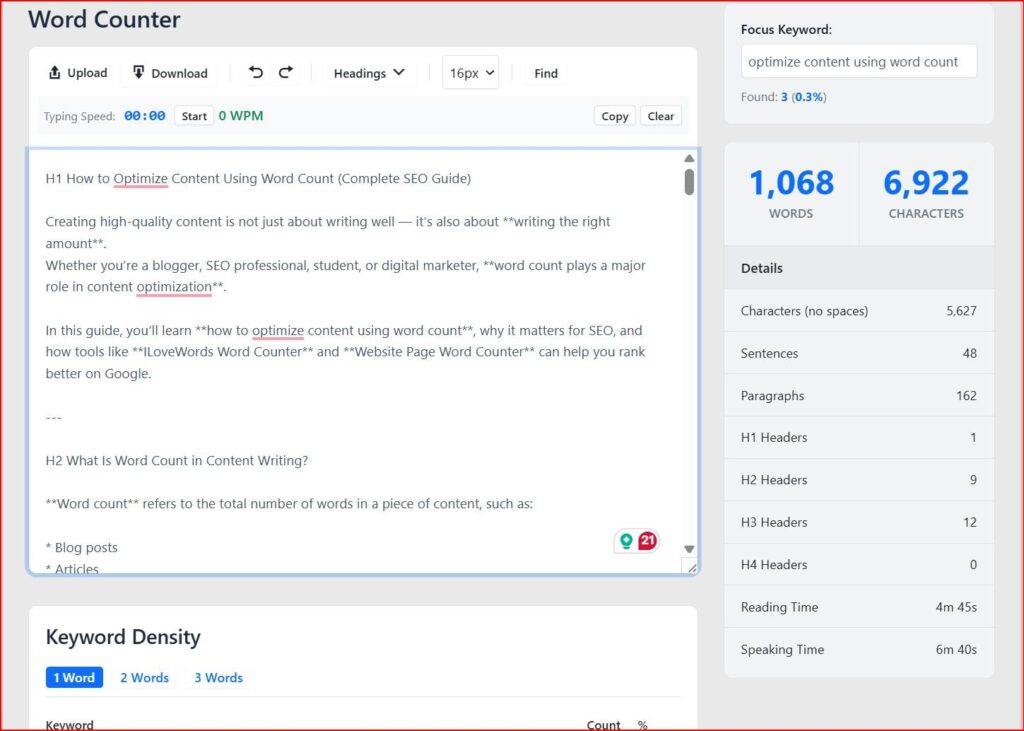
Manually estimating word count is inefficient. This is where ILoveWords Word Counter helps.
How ILoveWords Word Counter Helps
- Instant word, character, sentence, focus keyword and paragraph count
- Tracks content length in real time
- Helps maintain SEO-friendly word limits
- Ideal for blogs, essays, and web content
You can continuously adjust your content until you reach the optimal word count for your target keyword.
Step 4: Optimize Website Pages With Page-Level Word Count
Optimizing just written text isn’t enough. You must analyze live web pages.
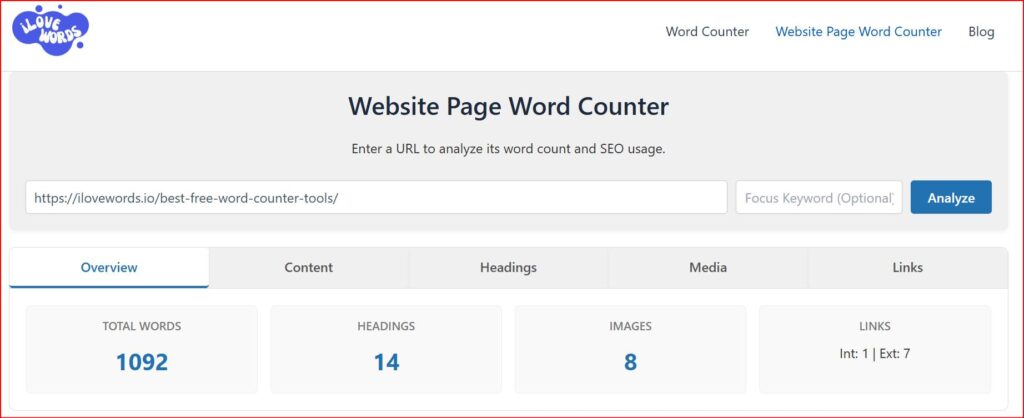
That’s where ILoveWords Website Page Word Counter becomes powerful.
Why Website Page Word Count Matters
- Reveals how much content is actually visible to search engines
- Helps identify thin pages
- Allows comparison with competitors’ pages
- Useful for content audits and SEO improvements
- Check the first ranking website content on Google
Example use cases:
- Checking if a service page is under-optimized
- Comparing your article length with ranking competitors
- Improving old blog posts by expanding content
Step 5: Avoid Keyword Stuffing While Increasing Word Count
Increasing word count doesn’t mean repeating keywords unnecessarily.
Bad practice ❌
SEO tools are SEO tools because SEO tools help SEO.
Good practice ✅
- Use synonyms
- Add examples
- Answer related questions
- Expand subtopics
Google values semantic depth, not repetition.
Step 6: Structure Content Properly
Long content without structure performs poorly.
Use:
- Clear H2 and H3 headings
- Bullet points
- Tables
- Short paragraphs (2–3 lines)
Well-structured long content:
- Improves readability
- Helps featured snippets
- Enhances user experience
Word Count vs Content Quality: What Matters More?
The truth is:
Quality + optimal word count = SEO success
- Short but complete content can rank
- Long but irrelevant content will fail
Word count should support the topic, not inflate it.
Common Word Count Mistakes to Avoid
- Writing long content just for SEO
- Ignoring user intent
- Publishing thin content under 300 words
- Copying competitors’ word count blindly
- Not updating old content
Tools like ILoveWords Word Counter help maintain balance by giving accurate content insights.
How to Use Word Count for Content Updates
Old content often loses rankings because:
- Competitors publish longer guides
- Search intent evolves
- New subtopics appear
Content Refresh Strategy
- Check current page word count
- Analyze top-ranking pages
- Add missing sections
- Update outdated info
- Re-optimize headings
Using Website Page Word Counter, you can quickly see how much content you need to add.
Final Thoughts
Optimizing content using word count is not about writing more — it’s about writing smart.
To summarize:
- Word count impacts SEO, but quality comes first
- Different content types need different lengths
- Competitive analysis is essential
- Tools make optimization faster and accurate
If you want a simple and effective way to optimize content length:
- Use ILoveWords Word Counter for writing
- Use Website Page Word Counter for SEO audits
Together, they help you create search-engine-friendly, user-focused content that performs better over time.
Bonus SEO Tip
After optimizing word count, always check:
- Readability
- Page speed
- Internal links
- Meta title & description length
Also Explore – BotBunch AI Tools Directory Webiste
BotBunch is a carefully selected AI tools directory and review website that helps creators, marketers, and businesses discover the best AI tools for content creation, SEO, productivity, and automation.
BotBunch provides honest reviews, feature comparisons, and practical use cases, making it easier to choose the right tools for optimizing content, improving word count strategy, and boosting overall digital performance.
Ta! Da!